Python Webview Kiosk "GTK Warning"

I am trying to build a simple Python Webview Kiosk snap for Ubuntu Core 22 and everything builds and seems to work fine up to the point of GTK opening the webview or webview.start() command.

Additionally, I have GDK_BACKEND=wayland set in my app’s environment stanza in my snapcraft.yaml and a bunch of plugs added and connected included graphics-core22 but still seems to be trying to use X11, at least from what I can see.ls

I used snappy-debug to get to this point, but there are no more errors that tell me why it’s not working besides the snap logs itself for this snap.

Link to snapcraft.yaml: https://github.com/nwdigital/nwd-python-kiosk/blob/main/snapcraft.yaml

Here’s the script that runs and the warning after running the script.

#!/usr/bin/python3

import webview
from flask import Flask, render_template_string
import gi
gi.require_version("Gtk", "3.0")
from gi.repository import Gtk,Gdk

webview.create_window('Web Kiosk', 'https://nwdigital.cloud', fullscreen=True)
webview.start()

Gtk-WARNING **: 15:54:05.165: cannot open display:

We’d likely need more information about what other snaps you have installed. I.E you’ll want something like ubuntu-frame running to provide the GUI context, which isn’t mentioned.

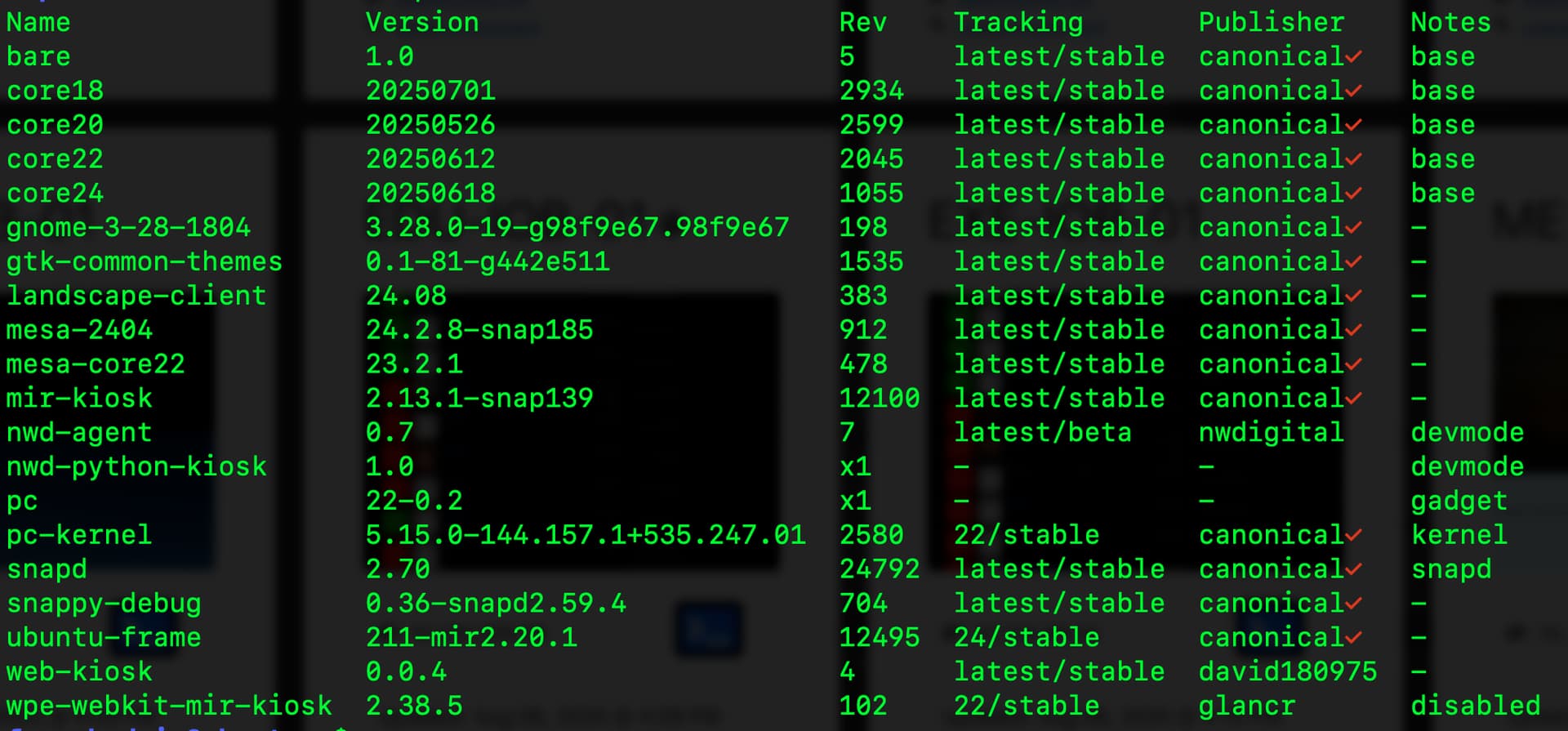
Could you show us snap list from that device and elaborate on if you’ve done anything with mir-kiosk ubuntu-frame or the like so far.

FWIW, there is no requirement your application snaps use the same core platform as the OS itself, which is me suggesting you should try Core24 for your snap to benefit from the newer Webkit platform it’ll have, this won’t be why it doesn’t work though.

2 Likes

Hi James, below is the screenshot of snap list. I have been using ubuntu-frame for a while and have built a firefox kiosk snap, it’s just alot overhead so I’m trying to reduce the snap size by using pywebview. I have wpe-webkit-mir-kiosk disabled while testing and ubuntu-frame is in daemon mode. Also, the snap I’m building is set to daemon mode, maybe that’s the issue? The reason I am targeting Core 22 is because Core 24 doesn’t like the touchscreen devices I’m using so I’m running Core 22 on these.

Appreciate any help I can get with this. FYI, I"m also attempting this with QT as a separate snap to see if that gets me any further along.

Hi again,

I’m not the most knowledgable at Ubuntu Core, I have used it, and it’s still snaps at heart, but I’m hoping there might be someone else who seeing this can help you out more directly, but I thought I’d bump this for you a little whilst I’m here :slight_smile:

With that in mind, my current thoughts are you have both ubuntu-frame and mir-kiosk, which as I understand them, conceptually are the same thing in the stack, albeit ubuntu-frame being the newer of the two.

My general thoughts here are that by having the two, it might be creating a situation where the snap connections don’t work as expected.

E.G., your application snap will define wayland and x11 plugs. In a classic system, these connect to the implicit system slot, because X11/Wayland aren’t provided by snaps.

In Ubuntu Core though, there should be a direct & explicit connection between your application and the GUI snap, because you have two, maybe this isn’t working? It wouldn’t be clear which one should be preferred over the other, and usually connections are 1:1, not always, but these would be. Since you have 2 potential snaps to slot to, I can’t predict how the connections would work here.

Could you let us see the snap connections nwd-python-kiosk output so we can look at where your two plugs are slotting (and ultimately make sure that they infact are). Ideally, I’d suggest you should ensure these are both pointing at Ubuntu Frame and potentially consider removing Mir Kiosk, the assumption for most production systems would likely be one or the other but not both.

Outside this, the direct logical conclusion of the original error message:

Gtk-WARNING **: 15:54:05.165: cannot open display:

Is probably trying to print $WAYLAND_DISPLAY or $DISPLAY, and showing as blank, because they’ve not been set. Once the connections are in place, it’s worth establishing why these are blank. I’m not sure what the modern practise is for setting these in Core (on non-core systems, let the extensions do it for you or in classic it’s not even a thing that needs to be considered), but at the basic level, the variable should exist because in Wayland, it’ll be the name of a Unix Socket for the Wayland connection itself (as a relative path). Without it you’ll have no socket to connect to and would experience what you’re seeing.
1 Like