Custom system tray icon for a java application

Hello, I need to enable my snap to be able to show a customized icon in the system tray. I am talking about a Java software which works fine on Ubuntu (.deb package), Windows 11 and MacOS. When I try to execute it as a snap file, it is not able to identify the System Tray, so the application terminates. The system tray is essential for this program, because I need to execute the application as a daemon and show the current job status (statuses: is working or in idle mode). I asked some AI ad they provided several useless/obsolete plugs for my .yml file, which are not working.
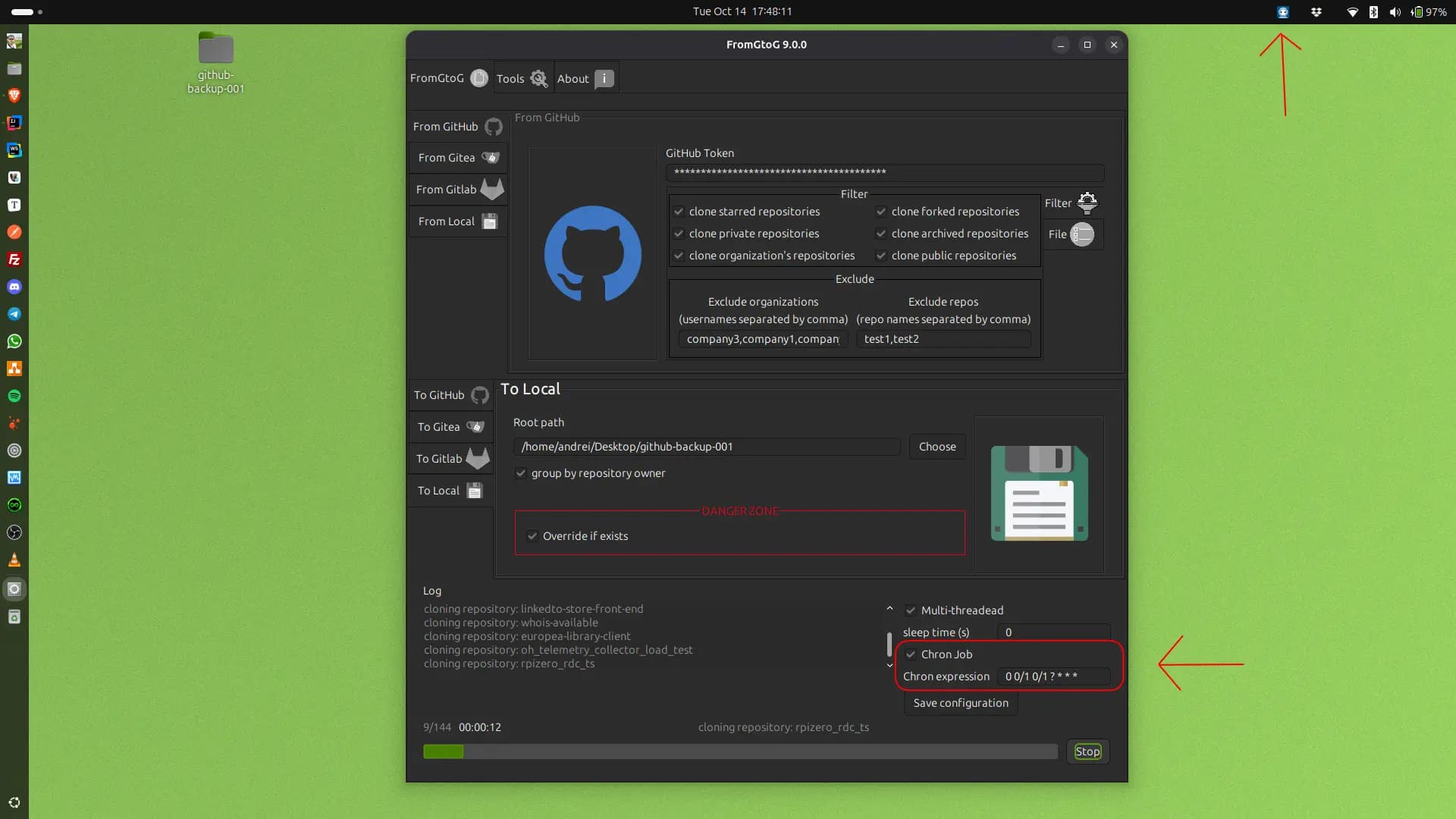
How I can allow to my snap to ā€œseeā€ the system tray?

Thank you, Andrei

P.S. this is my yaml file:

name: fromgtog
version: '9.0.6'
summary: Clone ALL GitHub/Gitea/Gitlab/Local to GitHub/Gitea/Gitlab/Local.
description: |
  Helps to clone all repositories from GitHub on Gitea/Local and vice versa.
grade: stable
confinement: strict
base: core24
icon: snap/gui/icon.png
title: FromGtoG
website: https://andre-i.eu
issues: https://github.com/goto-eof
source-code: https://github.com/goto-eof/fromgtog
donation: https://github.com/sponsors/goto-eof
contact: https://andre-i.eu/#contactme
compression: lzo
license: CC-BY-NC-4.0
slots:
  fromgtog-dbus:
    interface: dbus
    bus: session
    name: it.es5.fromgtog.dbus
apps:
  fromgtog:
    environment:
      ALSA_CONFIG_PATH: $SNAP/etc/asound.conf
      LD_LIBRARY_PATH: $LD_LIBRARY_PATH:$SNAP_DESKTOP_RUNTIME/usr/lib/$CRAFT_ARCH_TRIPLET_BUILD_FOR/libproxy:$SNAP_DESKTOP_RUNTIME/usr/lib/$CRAFT_ARCH_TRIPLET_BUILD_FOR/gio/modules
    command: executor
    extensions: [ gnome ]
    plugs:
      - network
      - x11
      - browser-support
      - unity7
      - home
      - desktop
      - desktop-legacy
      - removable-media
      - wayland
      - network-bind
      - audio-playback
      - alsa
    slots:
      - fromgtog-dbus
platforms:
  amd64:
    build-on: [ amd64 ]
    build-for: [ amd64 ]
  arm64:
    build-on: [ arm64 ]
    build-for: [ arm64 ]
parts:
  wrapper:
    plugin: dump
    source: snap/local
    source-type: local
  alsa-config:
    plugin: dump
    source: snap/local/asound.conf
    source-type: file
    organize:
      asound.conf: etc/asound.conf
    prime:
      - etc/asound.conf
  application:
    plugin: maven
    source: .
    build-packages:
      - openjdk-21-jdk
      - maven
      - sed
    override-build: |
      
      getproxy () {
      host=$(echo "$1" | sed -E 's|https?://([^:/]*):?[0-9]*/?|\1|')
      port=$(echo "$1" | sed -E 's|https?://[^:/]*:?([0-9]*)/?|\1|')
      }
      
      echo "Starting to build FromGtoG at $(date)"
      START_TIME=$(date +%s)
      echo "Start building FromGtoG at $(date)"
      
      set -eux
      JLINK_JDK_PATH="/usr/lib/jvm/java-21-openjdk-$(dpkg-architecture -q DEB_BUILD_MULTIARCH)"
      REQUIRED_MODULES="java.base,java.desktop,java.net.http,java.naming,java.sql,java.management,java.security.jgss,java.xml,java.logging,jdk.crypto.ec,java.security.sasl"
      
      echo "Creating custom JRE runtime with the following modules: $REQUIRED_MODULES"
      
      /usr/bin/jlink \
        --add-modules $REQUIRED_MODULES \
        --output "$SNAPCRAFT_PART_INSTALL"/usr/lib/jvm/custom-jre \
        --compress=2 \
        --no-header-files \
        --no-man-pages \
        --strip-debug
      
      http=""
      https=""
      
      if [ -n "${http_proxy:-}" ]; then
          getproxy "$http_proxy"
          http="-Dhttp.proxyHost=$host -Dhttp.proxyPort=$port"
      fi
      
      if [ -n "${https_proxy:-}" ]; then
          getproxy "$https_proxy"
          https="-Dhttps.proxyHost=$host -Dhttps.proxyPort=$port"
      fi

      export MAVEN_OPTS="$http $https"
      
      mvn clean install -DskipTests
      
      APP_JAR_NAME="fromgtog.jar" 
      APP_JAR_PATH="$SNAPCRAFT_PART_BUILD/target/$APP_JAR_NAME"
      
      if [ ! -f "$APP_JAR_PATH" ]; then
          echo "ERROR: jar not found in $APP_JAR_PATH"
          exit 1
      fi

      mkdir -p "$SNAPCRAFT_PART_INSTALL"/jar
      echo "Directory created: $SNAPCRAFT_PART_INSTALL/jar"

      echo "Copying $APP_JAR_NAME in $SNAPCRAFT_PART_INSTALL/jar/fromgtog.jar"
      cp "$APP_JAR_PATH" "$SNAPCRAFT_PART_INSTALL"/jar/fromgtog.jar
      
      echo "custom JRE runtime created in $SNAPCRAFT_PART_INSTALL/usr/lib/jvm/custom-jre"
      rm -rf "$JLINK_JDK_PATH"
      echo "temporary JDK removed."
      
      echo "Finished building FromGtoG at $(date)"
      END_TIME=$(date +%s)
      echo "Total time: $((${END_TIME} - ${START_TIME})) seconds"
    stage-packages:
      - glib-networking
      - libgtk-3-0
      - xdg-utils
      - libasound2
      - libasound2-plugins
      - alsa-utils
    after:
      - alsa-config
    override-prime: |
      snapcraftctl prime


Are there any denials showing up when your application launches? I mean, anything logged with DENIED in dmesg, or system journal. Or perhaps something of interest shows up in the terminal when your app starts?

At the application startup I just call the standart Java isSupported() method:

 if (!SystemTray.isSupported()) {
                JOptionPane.showMessageDialog(null, "System tray not supported on this platform.");
                return;
            }

Yeah, I can check system journal…give me one second.

journalctl shows that the application ran in background and then seems that died. I should see the window at least, but also the window is not visible. This happens only if I start it as snap. As I said, if I install the .deb, I can see also the tray icon.

Try using snappy-debug alongside your app instead of looking at the journal directly, that will give you suggestions on missing plugs or changes you need to make to your snap (or give us hints to help you at least)

EDIT: also note that you are duplicating a lot of plugs in your snapcraft.yaml, the gnome extension brings along a lot of them already so you do not need to explicitly set them additionally … you can check that by running snapcraft expand-extensions which will show you the expanded stuff that gets automatically added to your snapcraft.yaml by the extension

1 Like

Thank you @mborzecki1 and @ogra.

I ran snappy-debug and obtained the following log:

= AppArmor =
Time: 2025-10-15T17:0
Log: apparmor="DENIED" operation="open" class="file" profile="snap.fromgtog.fromgtog" name="/home/andrei/.java/fonts/21.0.8/fcinfo-1-infinity-Ubuntu-25.04-en-US.properties" pid=13029 comm="AWT-EventQueue-" requested_mask="r" denied_mask="r" fsuid=1000 ouid=1000
File: /home/andrei/.java/fonts/21.0.8/fcinfo-1-infinity-Ubuntu-25.04-en-US.properties (read)
Suggestions:
* adjust program to read necessary files from $SNAP, $SNAP_DATA, $SNAP_COMMON, $SNAP_USER_DATA or $SNAP_USER_COMMON
* add 'personal-files (see https://forum.snapcraft.io/t/the-personal-files-interface for acceptance criteria)' to 'plugs'

= AppArmor =
Time: 2025-10-15T17:0
Log: apparmor="DENIED" operation="mknod" class="file" profile="snap.fromgtog.fromgtog" name="/home/andrei/.java/fonts/21.0.8/fcinfo8056608105015825867.tmp" pid=13029 comm="AWT-EventQueue-" requested_mask="c" denied_mask="c" fsuid=1000 ouid=1000
File: /home/andrei/.java/fonts/21.0.8/fcinfo8056608105015825867.tmp (write)
Suggestions:
* adjust program to write to $SNAP_DATA, $SNAP_COMMON, $SNAP_USER_DATA or $SNAP_USER_COMMON
* add 'personal-files (see https://forum.snapcraft.io/t/the-personal-files-interface for acceptance criteria)' to 'plugs'

I guess that if I add personal-files plug, then it will work, right?

Well, normally $HOME should point to $SNAP_USER_DATA by default (which does not need any extra plugs), not sure how you got it to try to write to the actual homedir …

EDIT: just checked some other java snaps I know and they typically use:

-Duser.home=$SNAP_USER_DATA

to point the interpreter to use the correct home for caching and such … not sure if/how you could integrate that with your setup though

Thanks @ogra I have an executor file that contains all my env variables. Thanks a lot. I will try to rebuild and see if it is working.

I used the command

snapcraft expand-extensions

But cannot see duplicates.

In particular I executed:

snapcraft expand-extensions | yq ā€˜.apps.plugs’ | sort

and obtained the following:

      - network
      - x11
      - browser-support
      - unity7
      - home
      - desktop
      - desktop-legacy
      - removable-media
      - wayland
      - network-bind
      - audio-playback
      - alsa
      - personal-files

Snapcraft might nowadays have code to snip out the duplicates … try removing the explicit ones like desktop, desktop-legacy, home etc, they should still show up with expand-extensions even when you remove them from your snapcraft.yaml

yeah, you are right. Removed desktop, desktop-legacy and they appear again if I execute the expand. Instead home seems not a duplicate.

1 Like

It is not working :frowning:

Moreover all the solutions that I applied, at the end, they did not work. I can try to use JNA (Java Native Access), but I guess it requires a lot of time for the implementation. So I prefer to leave it as the last solution.

Does anyone have any ideas on how to fix this problem?

How exactly is it not working, is the app starting ?

Sorry for the delay Oliver.

I executed snappy-debug after swetting the new env variable -Duser.home=$SNAP_USER_DATA, and the outcome is the following:

  • the windows is not show
  • the tray icon is not shown
  • snappy-debug writes the following log:
Log: apparmor="DENIED" operation="open" class="file" profile="snap.fromgtog.fromgtog" name="/proc/cgroups" pid=38893 comm="java" requested_mask="r" denied_mask="r" fsuid=1000 ouid=0
File: /proc/cgroups (read)
Suggestions:
* adjust program to not access '@{PROC}/cgroups'
* add one of 'microstack-support, system-observe' to 'plugs'

I added the 3 missing JVM options (-XX:+IgnoreUnrecognizedVMOptions, -XX:-UseCoredumpFilter, -XX:-UseLargePagesReporting) and now I am retrying to execute:

 sudo snapcraft clean && sudo snapcraft pack; sudo snap remove fromgtog;  gnome-terminal -- bash -c "sudo snappy-debug.security scanlog; exec bash"; sudo snap install fromgtog_9.0.11_amd64.snap --dangerous && fromgtog

With the following configuration:

exec $SNAP/usr/lib/jvm/custom-jre/bin/java \
    -Djava.util.prefs.userRoot="$SNAP_USER_DATA" \
    -Duser.home=$SNAP_USER_DATA \
    -Dawt.useSystemAAFontSettings=on \
    -Dswing.aatext=true \
    -Dswing.defaultlaf=com.sun.java.swing.plaf.gtk.GTKLookAndFeel \
    -Djava.desktop.appName=$SNAP/meta/gui/fromgtog.desktop \
    -Dswing.crossplatformlaf=com.sun.java.swing.plaf.gtk.GTKLookAndFeel \
    -Djdk.gtk.version=3  \
    -XX:+IgnoreUnrecognizedVMOptions \
    -XX:-UseCoredumpFilter \
    -XX:-UseLargePagesReporting \
    -jar $SNAP/jar/fromgtog.jar "$@"

UPDATE (1):

Now I have 2 issues:

= AppArmor =
Time: 2025-10-18T00:3
Log: apparmor="DENIED" operation="open" class="file" profile="snap.fromgtog.fromgtog" name="/proc/cgroups" pid=75601 comm="java" requested_mask="r" denied_mask="r" fsuid=1000 ouid=0
File: /proc/cgroups (read)
Suggestions:
* adjust program to not access '@{PROC}/cgroups'
* add one of 'microstack-support, system-observe' to 'plugs'

= AppArmor =
Time: 2025-10-18T00:3
Log: apparmor="DENIED" operation="open" class="file" profile="snap.fromgtog.fromgtog" name="/proc/75601/coredump_filter" pid=75601 comm="java" requested_mask="wr" denied_mask="wr" fsuid=1000 ouid=1000
File: /proc/75601/coredump_filter (write)
Suggestion:
* adjust program to not access '@{PROC}/@{pid}/coredump_filter'

UPDATE (2):

I enabled the JVM verbose logging and it seems that the root cause is the following:

[0.247s][debug][jni,resolve] [Dynamic-linking native method sun.awt.X11GraphicsEnvironment.initDisplay ... JNI]
Authorization required, but no authorization protocol specified

It is like a permission issue.

SOLUTION:

So, I think I’ve found the solution.

First, I tried forcing the JVM to point to the x11 display server, but the Java application still didn’t detect the SystemTray.

Since I use the gnome extension with core24 and want to avoid going back to a 1990s GUI, I proceeded as follows:

1 - I decided to adopt com.dorkbox.SystemTray as the Jar library for managing the icon and menu in the System Tray. Switching from AWT SystemTray to dorkbox SystemTray requires a few code changes. This is the Maven dependency to include:

<dependency>
    <groupId>com.dorkbox</groupId>
    <artifactId>SystemTray</artifactId>
    <version>4.4</version>
</dependency>

2 - Once you’ve modified the Java code, you need to make changes to the snapcraft.yml file. Specifically, the stage-packages must contain the following library:

libappindicator3-1

3 - We must also modify the override-prime to create a symlink to the new version of libappindicator3-1 and thus make it visible to the dorkbox SystemTray (because libappindicator3 does not exists anymore, so we have to use libappindicator3-1 library). The bellow .yml configuration snippet is valid for both architectures: arm64 and amd64.

override-prime: |
      snapcraftctl prime
      LIB_DIR=$(find "$SNAPCRAFT_PRIME/usr/lib/" -maxdepth 1 -type d -name "*-linux-gnu" -print -quit)
      ln -sf libappindicator3.so.1.0.0 "$LIB_DIR/libappindicator3.so"

Finally, run the classic sudo snapcraft && sudo snapcraft pack, reinstall, and launch the application.

sudo snapcraft clean && sudo snapcraft pack; sudo snap remove fromgtog; sudo snap install fromgtog_*_amd64.snap --dangerous && fromgtog

Thank you, @ogra and @mborzecki1, for the debugging efforts!

P.S. I am attaching my full and working .yml file:

name: fromgtog
version: '9.1.2'
summary: Advanced utility for Git backup and bulk migration(GitHub,Gitea,GitLab,Local)
description: |
  Helps to clone all repositories from GitHub on Gitea/Local and vice versa.
grade: stable
confinement: strict
base: core24
icon: snap/gui/icon.png
title: FromGtoG
website: https://andre-i.eu
issues: https://github.com/goto-eof
source-code: https://github.com/goto-eof/fromgtog
donation: https://github.com/sponsors/goto-eof
contact: https://andre-i.eu/#contactme
compression: lzo
license: CC-BY-NC-4.0
slots:
  fromgtog-dbus:
    interface: dbus
    bus: session
    name: it.es5.fromgtog.dbus
apps:
  fromgtog:
    environment:
      ALSA_CONFIG_PATH: $SNAP/etc/asound.conf
      LD_LIBRARY_PATH: $LD_LIBRARY_PATH:$SNAP_DESKTOP_RUNTIME/usr/lib/$CRAFT_ARCH_TRIPLET_BUILD_FOR/libproxy:$SNAP_DESKTOP_RUNTIME/usr/lib/$CRAFT_ARCH_TRIPLET_BUILD_FOR/gio/modules
    command: executor
    extensions: [ gnome ]
    plugs:
      - alsa
      - audio-playback
      - browser-support
      - home
      - network
      - network-bind
      - removable-media
      - unity7
      - wayland
      - x11
    slots:
      - fromgtog-dbus
platforms:
  amd64:
    build-on: [ amd64 ]
    build-for: [ amd64 ]
  arm64:
    build-on: [ arm64 ]
    build-for: [ arm64 ]
parts:
  wrapper:
    plugin: dump
    source: snap/local
    source-type: local
  alsa-config:
    plugin: dump
    source: snap/local/asound.conf
    source-type: file
    organize:
      asound.conf: etc/asound.conf
    prime:
      - etc/asound.conf
  application:
    plugin: maven
    source: .
    build-packages:
      - openjdk-21-jdk
      - maven
      - sed
    override-build: |
      
      getproxy () {
      host=$(echo "$1" | sed -E 's|https?://([^:/]*):?[0-9]*/?|\1|')
      port=$(echo "$1" | sed -E 's|https?://[^:/]*:?([0-9]*)/?|\1|')
      }
      
      echo "Starting to build FromGtoG at $(date)"
      START_TIME=$(date +%s)
      echo "Start building FromGtoG at $(date)"
      
      set -eux
      JLINK_JDK_PATH="/usr/lib/jvm/java-21-openjdk-$(dpkg-architecture -q DEB_BUILD_MULTIARCH)"
      REQUIRED_MODULES="java.base,java.desktop,java.net.http,java.naming,java.sql,java.management,java.security.jgss,java.xml,java.logging,jdk.crypto.ec,java.security.sasl"
      
      echo "Creating custom JRE runtime with the following modules: $REQUIRED_MODULES"
      
      /usr/bin/jlink \
        --add-modules $REQUIRED_MODULES \
        --output "$SNAPCRAFT_PART_INSTALL"/usr/lib/jvm/custom-jre \
        --compress=2 \
        --no-header-files \
        --no-man-pages \
        --strip-debug
      
      http=""
      https=""
      
      if [ -n "${http_proxy:-}" ]; then
          getproxy "$http_proxy"
          http="-Dhttp.proxyHost=$host -Dhttp.proxyPort=$port"
      fi
      
      if [ -n "${https_proxy:-}" ]; then
          getproxy "$https_proxy"
          https="-Dhttps.proxyHost=$host -Dhttps.proxyPort=$port"
      fi

      export MAVEN_OPTS="$http $https"
      
      mvn clean install -DskipTests
      
      APP_JAR_NAME="fromgtog.jar" 
      APP_JAR_PATH="$SNAPCRAFT_PART_BUILD/target/$APP_JAR_NAME"
      
      if [ ! -f "$APP_JAR_PATH" ]; then
          echo "ERROR: jar not found in $APP_JAR_PATH"
          exit 1
      fi

      mkdir -p "$SNAPCRAFT_PART_INSTALL"/jar
      echo "Directory created: $SNAPCRAFT_PART_INSTALL/jar"

      echo "Copying $APP_JAR_NAME in $SNAPCRAFT_PART_INSTALL/jar/fromgtog.jar"
      cp "$APP_JAR_PATH" "$SNAPCRAFT_PART_INSTALL"/jar/fromgtog.jar
      
      echo "custom JRE runtime created in $SNAPCRAFT_PART_INSTALL/usr/lib/jvm/custom-jre"
      rm -rf "$JLINK_JDK_PATH"
      echo "temporary JDK removed."
      
      echo "Finished building FromGtoG at $(date)"
      END_TIME=$(date +%s)
      echo "Total time: $((${END_TIME} - ${START_TIME})) seconds"
    stage-packages:
      - glib-networking
      - libgtk-3-0
      - xdg-utils
      - libasound2
      - libasound2-plugins
      - alsa-utils
      - libappindicator3-1
    after:
      - alsa-config
    override-prime: |
      snapcraftctl prime
      LIB_DIR=$(find "$SNAPCRAFT_PRIME/usr/lib/" -maxdepth 1 -type d -name "*-linux-gnu" -print -quit)
      ln -sf libappindicator3.so.1.0.0 "$LIB_DIR/libappindicator3.so"

and my executor file:

#!/bin/bash
#
# Script is a wrapper which runs application in a bash script with the needed options
#
exec $SNAP/usr/lib/jvm/custom-jre/bin/java \
    -Djava.util.prefs.userRoot="$SNAP_USER_DATA" \
    -Duser.home=$SNAP_USER_DATA \
    -Dawt.useSystemAAFontSettings=on \
    -Dswing.aatext=true \
    -Dswing.defaultlaf=com.sun.java.swing.plaf.gtk.GTKLookAndFeel \
    -Djava.desktop.appName=$SNAP/meta/gui/fromgtog.desktop \
    -Dswing.crossplatformlaf=com.sun.java.swing.plaf.gtk.GTKLookAndFeel \
    -Djdk.gtk.version=3  \
    -jar $SNAP/jar/fromgtog.jar "$@"

The proof (took from latest/edge) (:

image

2 Likes

Ah moreover, if you are using dorkbox SystemTray and you see just 3 dots and not your icon in the system tray or sometimes your icon appears in the system tray and sometimes you have the 3 dots, then it means that appindicator.so tries to write in the real /tmp directory, and the snap does not have the permission (strict confinement). You should specify a custom tmp directory, so that override the system env var java.io.tmpdir in this way:

TMP_DIR="$SNAP_USER_DATA/tmp"
mkdir -p "$TMP_DIR"
 -Djava.io.tmpdir="$TMP_DIR" \

From what I have reconstructed, it seems that dorkbox takes the java.io.tmpdir and then passes it’s value to appindicator, appindicator then writes the icon in the /tmp directory, but because we have the strict confinement, app indicator is not allowed to do that, so it fails to show the icon.

I cannot give a full explanation why sometimes the system tray icon appears. What I know is that if I first execute my application from Intellij, I can see my system tray icon, then if I start the snap I will continue to see the icon and the next times the icon will be replaced by the 3 dots.

Anyway, I wanted to add also this information because it took to me about 3 days of debugging to figure out what happened. For a complete example take a look here and here.

1 Like