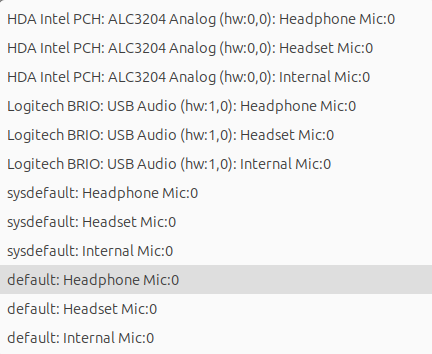
If you want to play to your headphones, use “default” output and choose your headphones as the default output in Audio Settings of the operating system itself.
I tried it with the Audacity Flatpak version 3.7.7, and it works there; I can select “default” (and many other Options ) in Flatpak, but in the Snap version 3.7.5, “default” isn’t displayed for me.
Therefore i installed 3.7.7. Audacity Snap Version and it has the same issue.
“default” isnt’t displayed there.
I can choose “default” only when alsa Plug isn’t connected, and the bluetooth speaker are working, but then alsacity doesn’t show other options to select.
Hi @TibSun75, just to confirm, are those the exact interface names you injected into the snapcraft.yaml file? If so, I think you need to use the names bluez and/or bluetooth-control, rather than Bluez and Bluetooth Control. I believe snapd expects the kebab-case names and probably ignores the capitalized ones.
I’m surprised that default isn’t selectable as an option in the Audacity snap though. I would think audacity should talk to the audio service on the system, rather than trying to talk directly to a bluetooth device. The clearest way to do that ought to be through default (I don’t know why it wouldn’t be showing up), and I would think choosing another audio source/output should work regardless of whether it’s bluetooth or not, because the audio should be going through PulseAudio, PipeWire, Alsa, or Jack, not trying to talk bluetooth. But clearly something isn’t working as expected here…