[URGENT] Request to *remove* the snap-declaration assertion from the scrcpy snap to the `scrcpy-runtime` content snap to avoid disruption of >30K users

Dear @reviewers and @store staff:

Previously in February, I have requested to connect the scrcpy snap to my scrcpy-runtime-2404 snap:

in the rationale of sharing the same runtime between scrcpy and other scrcpy-related snaps.

However, the limitations of such approach(unable to use resources like command completion and XDG desktop entry in the content provider without making a copy in the snap) made me dropped its usage soonly afterwards without publishing the change.

Recently, I’m notified by the snap users:

that the snap stops working after snap installation/refresh. I tried to reproduce the issue and can also confirm this is the case on Ubuntu 24.04/26.04:
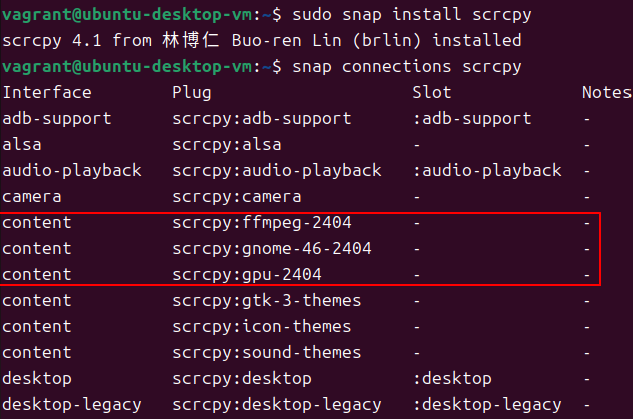
I’ve filed a bug to the snapd project regarding this problem:

Bug #2169733 " Globally auto-connected interfaces not connected on install/refresh in certain snaps : Bugs : snapd

and was informed by Oliver Calder(THANKS, BTW) that this is due to the missing auto-connection to the other depending content snaps(ffmpeg-2404,gnome-46-2404, and mesa-2404) from the store assertions:

"content": {
  "allow-auto-connection": [{
    "plug-attributes": {
      "content": "$SLOT(content)"
    },
    "slot-attributes": {
      "content": "scrcpy-runtime"
    },
    "slot-snap-id": [
      "7gXRlquQK8wzBw7XcBOsxpfhuBsNwCaL"
    ]
  }]
}

which is devestating as this seems to prevent my snap from functioning AT ALL for my (currently 33K) users without manually connecting these interfaces back.

Request

Please remove the scrcpy-runtime snap-declaration assertion from the scrcpy snap as soon as possible.

Some questions

1 Like

Quoting the seemingly answer from the bug report reply by Oliver Calder.

If you do in the future use a scrcpy-runtime content plug, then you need to be request a change to the snap-declaration assertions to allow both that content connection from a 3rd-party content provider not published by you, and maintain the default snap-declaration behavior for other content connections. The store reviewers should know how to do this. Linking to that scrcpy-buddy forum request comment may help.

1 Like

This request has been added to the queue for review by the @reviewers team.

  • Will the current installations of this snap automatically be remedied by this change?

The new snap-declaration assertion will be downloaded without needing any refresh. I’m not certain whether the connections will be changed automatically when that happens, but I would think so at least after rebooting.

Worst case, if not, you can make sure users have a refresh of some sort available by publishing a new revision to each channel. Doesn’t need to actually have any change, or have been originally uploaded before the assertion change, just some way to trigger a refresh. So you could re-upload 4.1 unchanged to latest/stable just to get a new revision there, and same for the 5.0 on latest/candidate and latest/edge. Or you could promote 5.0 from latest/candidate to latest/stable. Whatever you’d prefer, as long as users end up getting a refresh to re-trigger auto-connection checks. But again, maybe none of this is necessary and snapd will update auto-connections automatically (I recall this may be the case, when I was adjusting the openshell:docker assertion).

1 Like
  • Is this behavior (publically) documented anywhere?

The snap-declaration assertions and connection rule precedence is described some here, but I agree it’s not particularly clear from that that the base declaration is ignored when an assertion overrides it:

https://documentation.ubuntu.com/core/reference/assertions/snap-declaration/#connection-management

1 Like

As @oac mentioned, this is due to the fact that snapd does not merge declarations between the base declaration and a snaps own store declaration (also between content snaps too). That means that when crafting a snap declaration the @reviewers need to be careful to ensure they duplicate any relevant parts of the base declaration AND plugged content snaps into the snaps own declaration. It looks like what happened in this case is the reviewer who updated the declaration likely omitted adding the parts from the base declaration/content snaps so scrcpy lost the ability to autoconnect to these as expected.

I recall writing some documentation for this for the team before I left about using ifacetool to check that the new declaration would result in the same set of interface connections before and after making a modification to a snap declaration, but since that documentation is not public I am not sure if it is being heeded / still around. Perhaps @pfsmorigo or @jslarraz can comment?

Since there is nothing proprietary in that documentation, I have duplicated it below - hopefully it is useful.

How to validate auto-connections

When updating a snap declaration it is important to ensure that the updated declaration will provide the expected interface connection / auto-connection behavior. ifacetool <https://snapcraft.io/ifacetool/>_ embodies the logic used by snapd to simulate which interfaces get connected when a snap is installed.

Download the target snap metadata

ifacetool requires various metadata for the given snap to be present in the local working directory. For ease of use it is best to operate within its private storage area in ~/snap/ifacetool/common/.

$ cd ~/snap/ifacetool/common
$ SNAP=gimp
$ ifacetool fetch $SNAP

To ensure ifacetool can provide as much information as possible, the metadata for any snaps which it expects to connect to should also be fetched. An approximate list of these can be found via the default-provider specifier within the target snap’s snap.yaml.

$ providers=$(grep default-provider: gimp/snap.yaml | sed 's/\s\+default-provider: //' | sort -u)

Sometimes a snap may also plug other slots that do not use a default-provider and so these need to be manually accounted for by adding them to the list of providers:

$ providers+=" cups"

Once all these provider snaps have been enumerated, their metadata also needs to be fetched:

$ for snap in $providers; do \
    ifacetool fetch "$snap";  \
  done

Check initial auto-connection behavior

Finally ifacetool can be used to output the list of interfaces that would be auto-connected when the target snap and any of its dependencies are installed:

$ ifacetool auto-connections $SNAP $providers

This will output something like the following:

installing gnome-46-2404: OK
installing gtk-common-themes: OK
installing mesa-2404: OK
installing cups: OK
installing gimp: OK
gnome-46-2404:gnome-46-2404 > gnome-46-2404
gtk-common-themes:gtk-3-themes > gtk-3-themes
gtk-common-themes:icon-themes > icon-themes
gtk-common-themes:sound-themes > sound-themes
mesa-2404:gpu-2404 > gpu-2404
snapd:browser-support > browser-support
snapd:network > network
snapd:opengl > opengl
: cups-control
: desktop
: desktop-legacy
: gsettings
: home
: removable-media
: unity7
: wayland
: x11

Interfaces which auto-connect and their associated target are indicated by the greater-than sign >.

Validate updated snap declarations

When updating a snap declaration, the associated plugs or slots declarations can be specified in the respective snap’s plugs.json or slots.json file and then ifacetool re-run to validate the behavior. For instance, to auto-connect the cups-control plug for the gimp snap in the above example, the following could be added to the gimp/plugs.json file:

"cups-control": {
  "allow-auto-connection": "true"
},
$ ifacetool auto-connections $SNAP $providers

This will output something like the following, indicating that the cups-control plug has now auto-connected to the slot provided by the cups snap.

installing gnome-46-2404: OK
installing gtk-common-themes: OK
installing mesa-2404: OK
installing cups: OK
installing gimp: OK
cups:cups-control > cups-control
gnome-46-2404:gnome-46-2404 > gnome-46-2404
gtk-common-themes:gtk-3-themes > gtk-3-themes
gtk-common-themes:icon-themes > icon-themes
gtk-common-themes:sound-themes > sound-themes
mesa-2404:gpu-2404 > gpu-2404
snapd:browser-support > browser-support
snapd:network > network
snapd:opengl > opengl
: desktop
: desktop-legacy
: gsettings
: home
: removable-media
: unity7
: wayland
: x11
4 Likes

Hey @Lin-Buo-Ren

Sorry for the delay in this sensitive issue. I’ve removed the “content” section from the snap-declaration. Please let me know if this fixed the issue or if there anything else I can help with.

2 Likes

Hi Alex ^^

I believe you are completely right here. And yes, I can confirm that using ifacetool to validate interface auto-connections is still part of the documentation. I believe I’ve recommended everyone to use it, at least for the content interface, but I’ll make sure to remind the team about it. Additionally, I wonder if we could add a check in the store backend to warn the reviewers before updating the snap-declaration if we are going to hit one of these cases, I think it should not be very hard.

2 Likes

Download and re-upload the same revision doesn’t work:

$ snapcraft upload --release latest/stable scrcpy_490.snap
Issues while processing snap:
- binary_sha3_384: Error checking upload uniqueness.
Full execution log: '/home/brlin/.local/state/snapcraft/log/snapcraft-20261009-220802.322283.log'

In this case I’ll simply promote 5.0 builds to the stable branch and close all other branches to force all other risk channels to force trigger a change.

Thanks again for the help!

Ah sorry… another option is just to rebuild, perhaps with changing the version by adding a .1 to the version, then reupload.

1 Like

I’ve made the following operations to the scrcpy distribution:

scrcpy-snap$ snapcraft release scrcpy 496 stable
Released 'scrcpy' revision 496 to channels: 'stable'
scrcpy-snap$ snapcraft release scrcpy 497 stable
Released 'scrcpy' revision 497 to channels: 'stable'
scrcpy-snap$ snapcraft release scrcpy 498 stable
Released 'scrcpy' revision 498 to channels: 'stable'
snapcraft close beta
snapcraft close edge

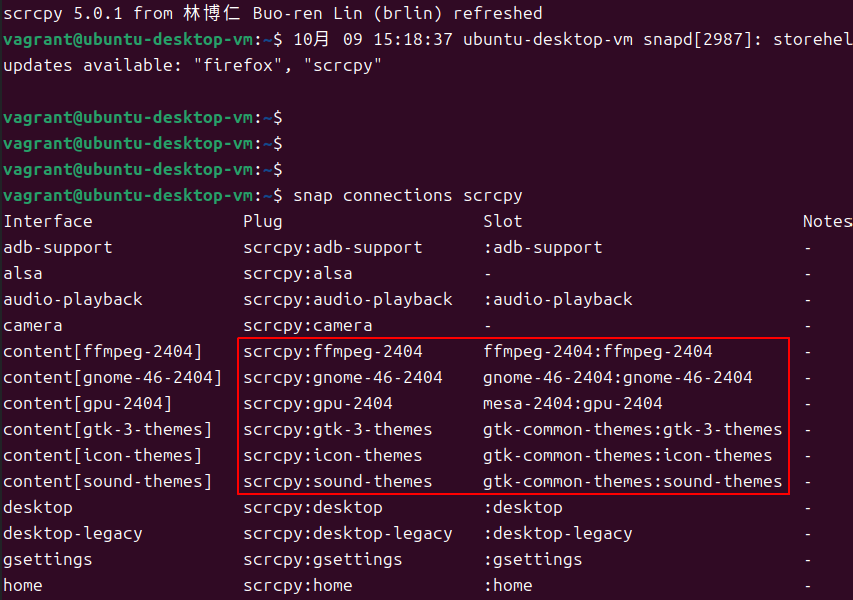
after a refresh I can verify that the content interfaces are automatically connected:

Thanks to everyone for the help!

1 Like